I’ve been a Docker loyalist for years. But lately, I’ve been experimenting with Podman, and honestly? It’s grown on me.
The switch started out of necessity. I’ve been working on FEGA for a while, I needed rootless containers for security reasons. Docker can do rootless, but it always felt like an afterthought. Podman was built for it from day one.
What’s the Difference?
At the surface, not much. Podman is CLI-compatible with Docker. This works:
alias docker=podmanSeriously. Most commands just work. But architecturally they’re different.
Docker runs a daemon. Every container talks to dockerd, which runs as root. Podman doesn’t have a daemon. Containers run as child processes of your shell. No daemon means no single point of failure, no root process sitting there waiting.
The Gotchas
A few things bit me:
- Compose — There’s
podman-composeandpodman kube play, but honestly? We still usedocker-composewith Podman as the backend. It just works. SetDOCKER_HOSTto your Podman socket and your existing compose files run unchanged, or letpodman composedo that wiring for you, since it hands off todocker-composewhen it’s installed. Sometimes the boring solution is the right one. - Networking — Containers on the default network can’t find each other by name. Docker’s default bridge has the same limit; it only feels like it works because compose quietly creates a network per project. Outside compose, in either tool, you make your own:
podman network create mynet
podman run --network mynet --name app1 myimage
podman run --network mynet --name app2 myimage- Build caching — This is where Docker still wins. BuildKit has SPOILED ME.
Docker BuildKit
It builds independent stages in parallel. If our multi-stage Dockerfile has a frontend and backend that don’t depend on each other, they build at the same time. It also does content-addressed caching! Meaning that a COPY only misses the cache when the files it copies actually changed, not just because their timestamps did.
For example:
FROM node:24 AS frontend
# build frontend (base image #1) ...

FROM golang:1.27 AS backend
# build backend (base image #2)...

FROM nginx:alpine
# build final stage (base image #3)...
COPY --from=frontend /ui/dist /usr/share/nginx/html
COPY --from=backend /api/app /app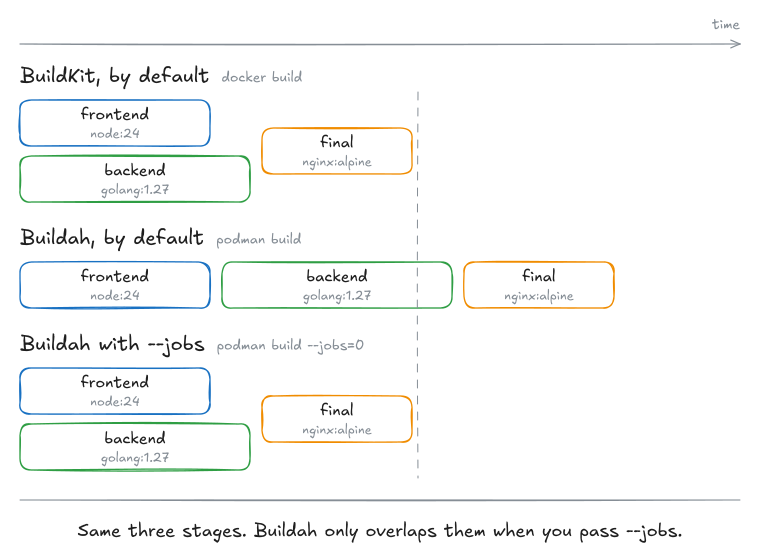
Podman uses Buildah, which builds stages one at a time unless you pass --jobs. podman build --jobs=0 lets independent stages run in parallel, but BuildKit does that by default and its caching is still ahead. For simple images you won’t notice. For anything with heavy multi-stage builds, you will.
When to Use What
I still reach for Docker when I need fast builds, or I’m just spinning up something throwaway. For anything security-sensitive or closer to production? Podman.
They read the same Dockerfiles, pull from the same registries, produce OCI-compliant images. Switching between them costs nothing.
Been away from writing for most of 2025. Feels good to be back.