I’ve used git worktrees for years. Mostly to review a PR without blowing up my current checkout, or to keep a long-running build isolated while I hacked on something else. Useful. Not life-changing.
Then I started running coding agents on multiple tasks at once, and the work suddenly had to go somewhere. The obvious somewheres don’t really work.
A second branch? I already have one checked out. A fresh clone of the repo for every task? Slow, wasteful, everything drifts apart the moment I fetch. git stash? Fine for one task. Not four.
That’s when worktrees stopped being a nice little trick and started feeling like the thing they were always built for.
My agents lean on them constantly now. Most of the time I don’t even see it happen.
What a worktree actually is
OK so here’s the thing. A git repo has one .git/ directory. That’s where every commit, every tree, every blob you’ve ever made lives. It’s the database.
A worktree is a separate working directory that shares that database, but has its own HEAD, its own index, its own files on disk. That’s it. That’s the whole concept.
In plain terms: multiple branches checked out at the same time, in different folders. No stashing. No “you have uncommitted changes, cannot switch branch.” Each worktree minds its own business, and the shared .git/ is the only thing tying them together.
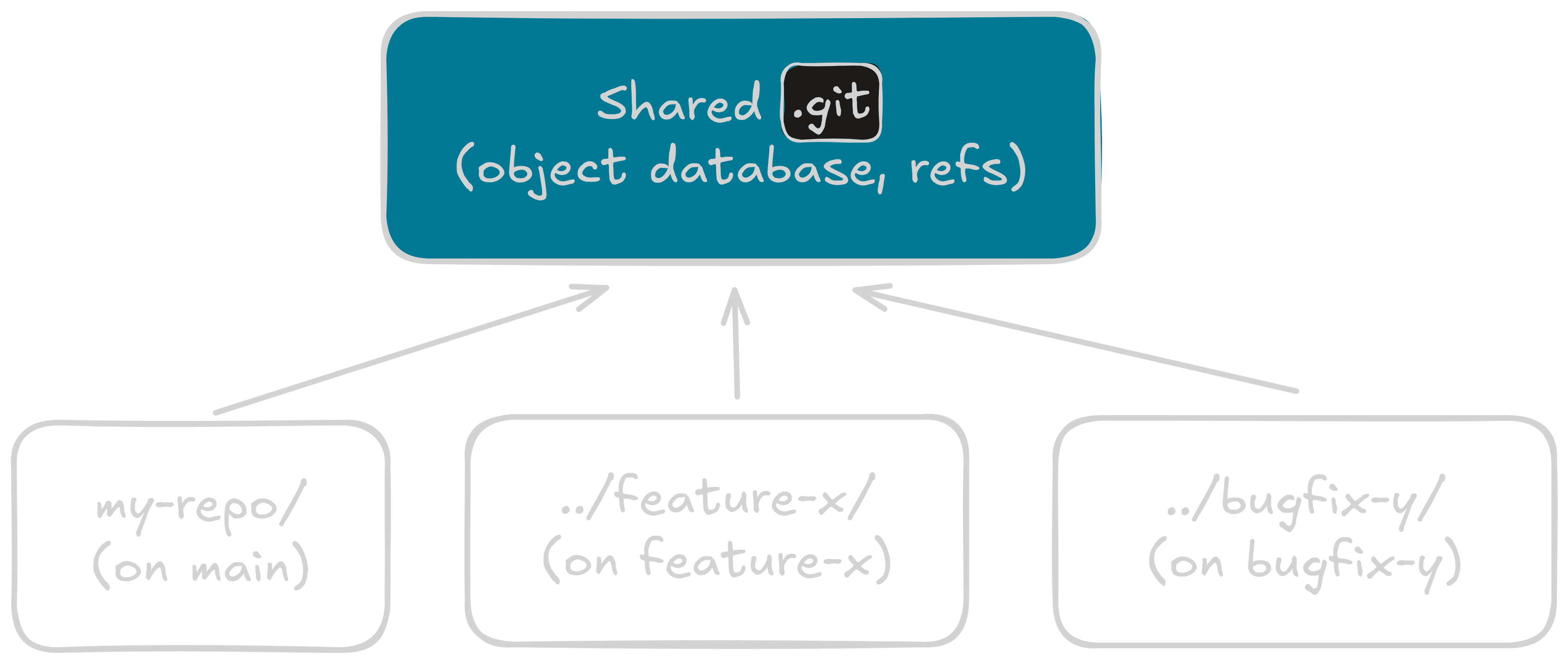
Before you ask: yes, you could just clone the repo three times. You’d also duplicate the object database three times, wait three times as long to set them up, and watch them drift independently every time you fetch.
You could also branch-switch in your existing checkout. Fine, until you have uncommitted changes, a running dev server, or a build watcher that doesn’t know the files changed out from under it.
Worktrees sit in the middle. One database underneath, several working dirs alongside it. Making or deleting one stops feeling like a decision you have to think about.
my-repo/              ← main worktree (contains .git/)
  .git/               ← the shared object database
  src/
../feature-x/         ← extra worktree on branch feature-x
  src/                ← fully independent working files
../bugfix-y/          ← extra worktree on branch bugfix-y
  src/
Why agents reach for them
Because isolation is the natural unit of parallel work.
Two processes can’t safely share a working directory. One agent runs git checkout mid-edit and the other’s uncommitted changes either ride along onto the wrong branch or block the switch outright. A build writes to the same folder a watcher is staring at, and that watcher has a bad time. Give each task its own folder and most of this quietly stops happening.
You could clone the repo for each task to get that isolation. Worktrees get you there without duplicating the object store or waiting out a fresh setup every time.
Creating a worktree is nearly free. You get a fresh folder with its own HEAD and index, and the object database already on disk serves it. Nothing gets fetched or copied, which also means nothing to drift.
So the shape of a reasonable agent is short: spin up a worktree on a new branch, do the work, merge or throw it away. That’s the whole loop.
If your agent runs multiple tasks in parallel without stomping on your working copy, this is almost certainly how. Mine does, constantly.
What you give up by treating them as invisible plumbing
Here’s the part that snuck up on me. When I create a worktree, I know it exists. I picked the path. I’ll remember to clean it up. When an agent creates one, none of that is true. The tool is fine. I’ve been using it for years. What’s different now is that when the agent uses it, it all happens without me looking.
A few ways this bites:
Orphan worktrees pile up on disk. Agent crashed, got killed, forgot to clean up. Doesn’t really matter why. The folder sticks around. du -sh quietly grows. git status in my main checkout doesn’t know a thing about it.
Orphan branches multiply too. I rm -rf the folder because it’s the obvious move. The branch stays. The admin entry inside .git/ stays. git branch gets longer and longer, and I start wondering where all those names came from.
pwd stops being reliable. I open a terminal inside what I think is my main checkout, run git status, and see unfamiliar changes. I’m in a worktree. Commands I run do things I didn’t expect.
Commits get forgotten. I made one in a worktree. Never merged it. The agent moved on. That commit is now reachable only from a branch I never look at, in a folder I’ve stopped opening.
None of these are the agent’s fault. The agent’s doing what I asked. The gap is that I wasn’t watching.
The four commands you actually need
Four. That’s it.
(Well, four plus one bonus at the end, but really, four.)
git worktree add -b feature-x ../feature-xMakes a new branch feature-x from HEAD, and sets up a new worktree at ../feature-x checked out on it. Drop the -b if the branch already exists.
Use this when you want to spin up an isolated checkout yourself. Your agent does it for you, yes. You can too.
git worktree listEvery worktree. Its path, its HEAD, its branch. If something feels off, run this first. The annotations matter. (bare), (detached HEAD), prunable all tell you something.
git worktree remove <path>The right way to delete a worktree. Removes the folder and the admin entry git keeps inside .git/.
rm -rf is what leaves the admin entry behind. Don’t do that.
git worktree pruneFor when you already did the thing I just told you not to do.
prune reaps admin entries whose folders have vanished. Safe to run whenever. Good thing to run after you’ve been sloppy.
Oh, and: git worktree add --detach <path> makes a worktree in detached-HEAD state, no new branch. Useful for a one-off diagnostic checkout. That’s the bonus.
Go break it
Here’s the whole thing in one sandbox. Add a few worktrees. Try rm -rf on one. The folder vanishes but the admin entry inside .git/worktrees/ is still there, flagged red. Run list and spot the prunable annotation. Then prune to reap it. That’s the contrast worth learning.
Agents handle worktrees fine. They really do.
Still, if you can’t name what they’re doing, you can’t audit the work, recover when something fails, or clean up after. So look.
Four commands.